
How to Prepare a Journal TOC Graphic
Confirm the target journal’s TOC category and dimensions, select one paper message, and rebuild the composition for its final display size before exporting.
Record the actual journal request
Write down the journal, article type, submission stage and named image category. Find its current instructions for size, file format, text and supporting description. A publisher-level recommendation may not cover every journal or article type; an older example is not a current technical specification.
Reduce the narrative rather than only the file
Choose a principal object and relationship. Remove secondary pathways, repeated backgrounds and long labels that belong in the paper. A large multi-panel image usually needs re-composition rather than simple reduction. Compare paper-panel layout with graphical abstract planning.
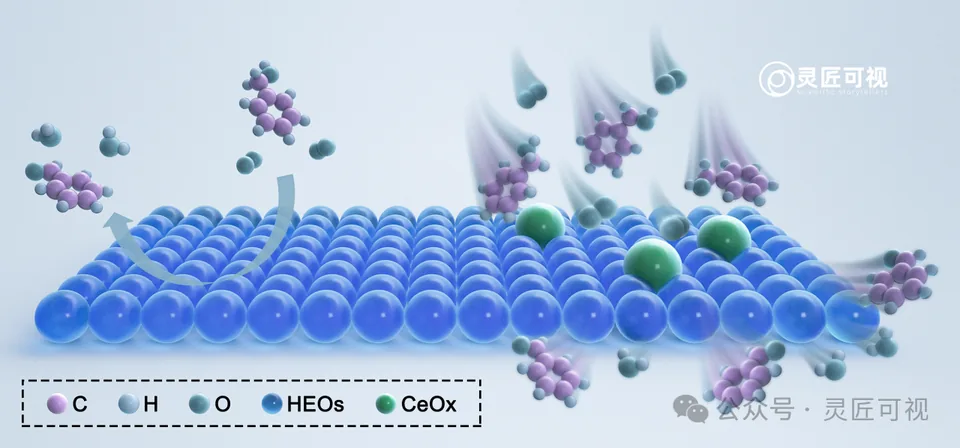
Learn from a substrate-and-site composition
The catalytic-interface archive gives the continuous substrate, selected sites and molecules different visual roles. When adapting such a structure, preserve the supported meaning of its arrows and simplify only the information needed for the TOC task. Obtain permission before reusing artwork.
Check at the intended display size
Inspect the actual final dimensions, labels and object boundaries. Check the effective resolution of embedded images instead of only an export setting. Verify accepted color and file requirements, then open the exported file outside the editor.
Use a final submission record
Record the canonical journal instructions, retrieval date, target dimensions, selected format, source-material permissions and corresponding manuscript version. Retain the editable original. TOC design services can address a defined composition and delivery scope; price preparation helps make quotes comparable.

Sources and scope
Sources apply within their stated scope. Archive records describe existing work; international account access and checkout remain closed.
Choose the next step
Understand the platform · Scope a design commission · Contact support