
Scientific Paper Figure Design and Multi-Panel Layout
Prepare a paper figure around its research question, panel relationships and target journal. Agree the drawing and file-delivery scope before production.
Decide what the figure must explain
A paper figure may combine a preparation route, an application location and a local mechanism. List the purpose of each panel before choosing a 2D or 3D style. Keep measured results, explanatory drawings and proposed relationships identifiable.
Use overview and comparison for different tasks
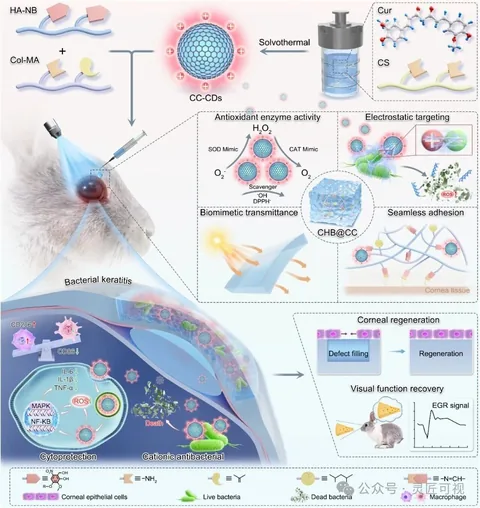
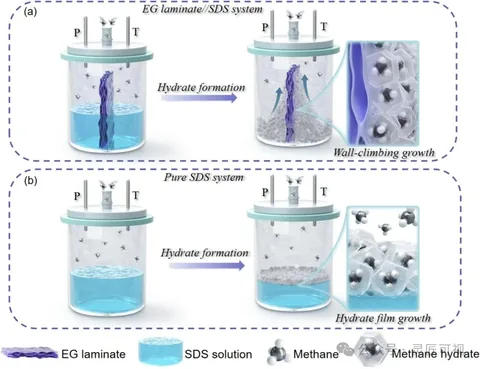
The ACS Nano hydrogel case connects components to an eye application and several local insets. The methane-hydrate case uses upper and lower systems for comparison, with horizontal arrows for change within each system. These structures answer different reading tasks.
Confirm the source material and deliverables
Supply an author-approved abstract or figure sketch, names and relationships, reference data, intended dimensions and the current journal instructions. Agree panel count, illustration complexity, editable objects, file formats, review rounds and deadline in writing. Keep the source project and inspect the actual delivered file.
Separate a paper figure from a TOC graphic
A multi-panel figure can support several questions in the main text. A TOC graphic must work at the journal's directory display size and often needs a different composition. Use the paper-figure guide, panel-layout guide and quote preparation guide before sending a non-confidential brief to the team.
Choose the next step
Understand the platform · Scope a design commission · Contact support